If you have the official firmware 3.0 for the iPod Touch/iPhone it is possible to jailbreak, though it will be less complicated when QuickPwn comes out. For now, this method is the working alternative.
1. First, open iTunes, and shift+click on the "restore" button and upgrade yourself to the 3.0 firmware (even if you already have it).
2. Set it up as a new iPod/iPhone in iTunes.
3. It should work on the 3.0 firmware, un-jailbroken as of now.
4. Open "redsn0w" and browse for the firmware.
5. Click "Next".
6. Only check Cydia, not Icy.
7. Plug in the device, then turn it off.
8. Follow the instructions for putting it into DFU mode (power button for 3 seconds, both buttons for 10 seconds, only home button for 30 seconds). It will do the rest.
9. When it turns on again, you should have a normal iPod/iPhone with Cydia installed. It is successfully jailbroken.
Disclaimer: Know that I'm not responsible for any damages encountered to your device.
Jailbreaking is a process that allows iPad, iPhone, iPod Touch, and recently Apple TV users to gain root access to the command line of the iOS operating system, thereby removing usage and access limitations imposed by Apple. Once jailbroken,[1] iOS users are able to download extensions and themes that are unavailable through the App Store (via installers such as Cydia) and perform other tasks that are not possible on store-bought devices, including installing non-Apple operating systems such as Linux. A jailbroken iPad, iPhone or iPod Touch running iOS can still use the App Store and iTunes and other normal functions, such as making telephone calls.
Jailbreaking is different from SIM unlocking, which, once completed, means that the mobile phone will accept any SIM without restriction on, for example, the country or network operator of the owners choice. Under the DMCA of 2010, jailbreaking is legal in the United States, although Apple may claim it to void your warranty. It is also legal in many other countries including the EU. The jailbreaking process can be quickly and easily reversed by restoring the device in iTunes.
Cydia creator Jay Freeman estimates that over 10% of all iPhones are jailbroken.
In essence, jailbreaking your iPhone means freeing it from the limitations imposed on it by AT&T and Apple. You install a software application on your computer, and then transfer it to your iPhone, where it "breaks open" the iPhone’s file system to allow you to modify it.
Why Would I Want to Jailbreak My Phone?
It lets you do everything from customizing the look of your iPhone to installing third-party applications and customized ringtones on it. Depending on how far you're willing to go, you can do even more than that: Jailbreaking even lets you to unlock your phone so you can use it with a carrier other than AT&T.
Why Wouldn't I Want to Jailbreak My iPhone?
Once you do it, you're on your own. You may have voided your warranty, so you can't rely on AT&T or Apple to fix any problems you encounter. All of the applications that jailbreak your phone are unauthorized and could damage or completely disable your iPhone. Your slick smartphone could end up as nothing more than a very expensive paperweight.
Can I Fix My iPhone if Something Goes Wrong?
Maybe. Some users have reported that they were able to connect a malfunctioning iPhone to iTunes and restore it to its original settings, which resolved the problem. Not all users have had this experience, though, and you certainly can't count on AT&T or Apple to provide you with tech support once you've taken this unauthorized step.
Privacy advocates aren't pleased with Google Web History, which records the sites you visit, searches you make, images and videos you view, and even sites you haven't been to but may like. When you create a Google account, the option to use Web History is checked by default. Opting out doesn't mean Google doesn't collect the information, just that you don't have such easy access to it.
It feels like I've been using Gmail for five or six years, but I found my Web history begins in January 2007, according to Google. The entries since that time are far from a complete log of all my searches and surfing; apparently, events are recorded only while you're logged into your Google account.
To open your Web history, sign into your account, click My Account in the top-right corner of the main Google screen, and choose Web History under My products. The default view is All History. Your other view options include Web, Images, News, Videos, Maps, Blogs, and even the Sponsored Links you were served up, just in case you missed them the first time.
View a record of your online activities in Google Web History.
(Credit: Google)
I was ready to find all sorts of embarrassing information about myself in the logs, but they were really kinda boring, which probably indicates their accuracy. I did find several entries that didn't belong—obviously, someone borrowed my PC while I was logged into my Google account.
To remove unwanted items in your history, click Remove items in the left pane, check the entry or entries you wish to excise, and click Remove.
To surf without being tracked, click the left pane's Pause button. (Frankly, I'm inclined to sign off the account altogether.) When you're ready to go back on the record, click Resume.
One of my favorite Web History features is Trends, which shows your top 10 queries, sites, and clicks over the past seven days, month, year, or all recorded. I had fun trying to figure out why I did almost three times more searching last April than I did the previous October, or why I've never searched at 2 a.m. A real shocker for me was that I search more often on Sundays than I do on Fridays. I would've never guessed that one.
Get a view of your search history by hour, day, or month in Google Web History's Trends.
(Credit: Google)
Maybe I should have qualms about anybody keeping such close tabs on me, but the fact is, most or all of this information is tracked whether or not I sign up for the service, unless I use an anonymity service or product.
Customizing history settings in Firefox and Internet Explorer, and all browsers let you wipe your Web history clean, but these settings don't affect Google's servers.
Google's privacy policy offers a link to DoubleClick's opt-out cookie, but the best solution is to disable cookies altogether.
When it comes to the Google search box, you already know the tricks: finding exact phrases matches using quotes like "so say we all" or searching a single site using site:lifehacker.com gmail.
But there are many more oblique, clever, and lesser-known search recipes and operators that work from that unassuming little input box.
Dozens of Google search guides detail the tips you already know, but today we're skipping the obvious and highlighting our favorite obscure Google web search tricks.
10. Get the local time anywhere
What time is it in Bangkok right now? Ask Google.
Enter simply what time is it.. to get the local time in big cities around the world, or add the locale at the end of your query, like what time is it hong kong to get the local time there.
9. Track flight status
Enter the airline and flight number into the Google search box and get back the arrival and departure times right inside Google's search results.
8. Convert currency, metrics, bytes, and more
Google's powerful built-in converter calculator can help you out whether you're cooking dinner, traveling abroad, or building a PC.
Find out how many teaspoons are in a quarter cup (quarter cup in teaspoons) or how many seconds there are in a year (seconds in a year) or how many euros there are to five dollars (5 USD in Euro).
For the geekier set, bits in kilobytes (155473 bytes in kilobytes) and numbers in hex or binary (19 in binary) are also pretty useful.
7. Compare items with "better than" and find similar items with"reminds me of"
Reader Adam taps the wisdom of the crowds by searching for like items using key phrases.
He writes in:
Simply search for, in quotes: "better than _keyword_"
Some example results:
Results 1 - 100 of about 550 English pages for " better than WinAmp".
Results 1 - 57 of 57 English pages for " better than mIRC".
Results 1 - 100 of about 17,500 English pages for " better than Digg". (Wow. Poor Digg.)
The results will almost always lead you to discovering alternatives to whatever it is you're searching for. Using the same concept, you can use this trick to discover new music or movies. For example, " reminds me of _someband_" or "sounds like _someband_" will pull up artists people have thought sounded similar to the one you typed in. This is also a great way to find good, no-name musicians you'd probably never know of otherwise.
Examples:
Results 1 - 88 of 88 English pages for " reminds me of Metallica".
Results 1 - 36 of 36 English pages for " similar to Garden State".
Results 1 - 66 of 66 English pages for " sounds like The Shins".
Just get creative and you'll, without a doubt, find cool new stuff you probably never knew existed.
6. Use Google as a free proxy
What, your company blocks that hip new web site just because it drops the F bomb occasionally? Use Google's cache to take a peek even when the originating site's being blocked, with cache:example.com.
5. Remove affiliate links from product searches
When you're sick of seeing duplicate product search results from the likes of eBay, Bizrate, Pricerunner, and Shopping.com, clear 'em out by stacking up the -site:ebay.com -site:bizrate.com -site:shopping.com operator. Alternately, check out Give Me Back My Google (original post), a service that does all that known reseller cleaning up for you when you search for products. Compare this GMBMG search for a Cruzer 1GB flash drive to the regular Google results.
4. Find related terms and documents
Ok, this one's direct from any straight-up advanced search operator cheat sheet, but it's still one of the lesser-used tricks in the book. Adding a tilde (~) to a search term will return related terms. For example, Googling ~nutrition returns results with the words nutrition, food, and health in them.
3. Find music and comic books
Using a combination of advanced search operators that specify music files available in an Apache directory listing, you can turn Google into your personal Napster.
(Sub out Nirvana for the band you're interested in; use this one in conjunction with number 7 to find new music, too.) The same type of search recipe can find comic books as well.
2. ID people, objects, and foreign language words and phrases with Google Image Search
Google Image search results show you instead of tell you about a word.
Don't know what jicama looks like? Not sure if the person named "Priti" who you're emailing with is a woman or a man?
Spanish rusty and you forgot what "corazon" is?
Pop your term into Google Image Search (or type image jicama into the regular search box) to see what your term's about.
1. Make Google recognize faces
If you're doing an image search for Paris Hilton and don't want any of the French city, a special URL parameter in Google's Image search will do the trick.
Add : imgtype=face to the end of your image search to just get images of faces, without any inanimate objects.
Try it out with a search for rose (which returns many photos of flowers) versus rose with the face parameter.
This isn't really a tech. trick, but it's an amusing one.
Do it yourself.....
1) Open an empty notepad file
2) Type Bush hid the facts
3) Save it as whatever you want.
4) Close it, and re-open it.
This is what you get.. All hidden!!
Reasons for why this happens:
Bush hid the facts (sometimes also this app can break) is the common name for a bug present in the function IsTextUnicode of Windows NT 3.5 and its successors, which causes a file of text encoded in Windows-1252 or similar encoding to be interpreted by applications that use it (such as Notepad) as if it were UTF-16LE, resulting in mojibake.
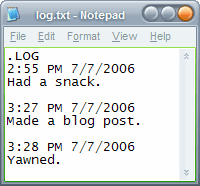
Hi there! Here is an odd little feature ! Even a Notepad could have a hidden feature! Microsoft's otherwise featureless text editor:
It can be used to make log files
1. Open Notepad and type .LOG on the first line 2. Save the file as whatever you want.
Now every time you open the file the current date and time will be appended to it, which make it super-quick to create simple texty log files for whatever you want. Of course, every word processor and many text editors have shortcut keys for inserting the date, but simplicity does have its appeal. Microsoft knowledgebase says this feature only applies to Windows 98 and ME, but it seems to work fine in XP / Vista as well. Best of lucks!


 Privacy advocates aren't pleased with Google Web History, which records the sites you visit, searches you make, images and videos you view, and even sites you haven't been to but may like. When you create a Google account, the option to use Web History is checked by default. Opting out doesn't mean Google doesn't collect the information, just that you don't have such easy access to it.